TPU 90A vs TPU 68D (TPU for AMS)
Updated: Aug 10
In this article you’ll learn the real-world differences between two popular flexible 3D printing filaments; TPU 68D (Bambu Lab TPU for AMS) and TPU 90A. Through hands-on projects and strength tests, we’ll compare them in areas like print speed, grip, strength, flexibility, and ease of use. By the end, you’ll have a clear understanding of which material is best suited for different types of projects, whether you’re printing functional parts, wearables, or protective components.
Links to Projects in this Article
If you would like to create any of these projects yourself, you can find them below:

TPU 90A vs TPU 68D (TPU for AMS) - Which Flexible Filament Should You Use?
Flexible filaments open up a whole new world of 3D printing possibilities, but not all TPUs behave the same way. Today we’re comparing two common options:
TPU 68D: marketed by Bambu Lab as TPU for AMS, a firmer, more rigid but still flexible material
TPU 90A: a softer, stretchier TPU commonly used for wearables and grippy parts

If your printer can handle TPU, chances are it can print both of these materials. You don’t need a Bambu Lab printer to use them, but understanding the differences will help you choose the right one for your project. Over the years, I’ve found that most of my household flexible printing needs fall neatly into one of these two types of filaments. Let’s put them head-to-head and see how they perform.

How We Tested
Every part shown here was printed using default Bambu Studio slicer settings. Some notable settings:
0.4 mm nozzle
15% infill
Two wall loops
The goal was to evaluate how these filaments perform in practical, everyday applications, without special tuning or exotic print profiles.
Toy Tank Treads
To kick things off, I printed tank treads for the Cyberbrick Forklift Kit, a fun project that highlights flexibility and grip.

TPU 68D (TPU for AMS) Results
Print time: 27 minutes
Appearance was clean with minor stringing
Too stiff for the application because it bound up the motors
Provided poor grip
The tread snapped when removed from the forklift

TPU 90A Results
Print time: 49 minutes
More flexible and grippy
Allowed smooth control of the forklift
No motor binding
Far better traction
Strength Test
To compare durability, I hung weight from the treads:
TPU 68D (TPU for AMS1): Broke with less than 9 pounds
TPU 90A: Withstood 27–36 pounds

TPU 90A at normal size 
TPU 90A Stretched to the max
Verdict
TPU 90A clearly came out on top. If you are interested in building this forklift, you can see the assembly in this video. It is a fun project!
Custom Furniture Pads
Something far more practical: custom chair and recliner feet. I designed parametric furniture pads to replace the flimsy stick-on pads that never seem to fit properly. Parametric designs allow you to change dimensions to fit your own furniture.


TPU 68D (TPU for AMS) Results
Prints were nearly flawless
Firm feel
Slid easily on hardwood floors
Held up well under weight

TPU 90A Furniture Pads
Softer and grippier
Better at keeping furniture in place
Slight deformation under heavy weight
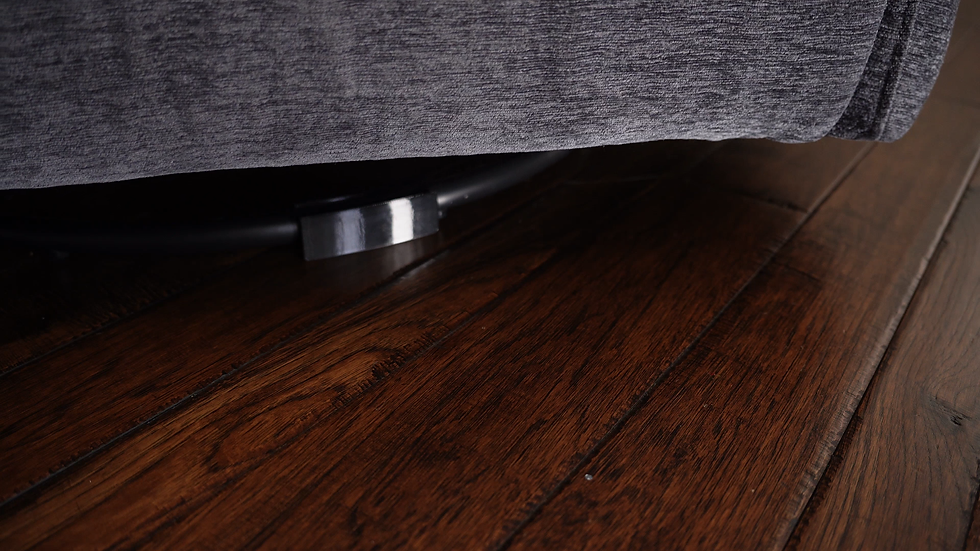
A non-scratching and grippy TPU 90A solution for the recliner
Verdict
Want furniture to stay put? TPU 90A, I used this for my recliner.
Want a little glide? TPU 68D (TPU for AMS), I used this for my kitchen chairs.
For TPU 90A pads, I recommend increasing to 30% infill and extra wall loops for better rigidity.
Wearables: 3D Printed Belts
Could TPU printing replace a traditional leather belt? I decided to find out.
TPU 68D (TPU for AMS) Results
Print time: 8 hours 22 minutes
Felt stiff, like a brand-new belt
Made some noise when adjusting in my seat which was a bit undesirable
Very durable

Want a flexible belt without going to a store? TPU printing is perfect for this.
TPU 90A Furniture Pads
Print time: 20 hours 30 minutes
Much more comfortable and flexible
Quiet to wear
Minor stringing but looked great
Strength Test
To determine how many extra servings of dessert each belt could handle, I hung chairs from them:
TPU 68D (TPU for AMS): Broke at about 40 pounds
TPU 90A: Held up to 50 pounds

Both were strong, but TPU 90A stretched more and felt better in everyday use.

Verdict
I’ve personally worn a TPU 90A belt for over a year with zero issues. It's the winner here although TPU 68D (TPU for AMS) would probably work too.
Coaster Feet
A smaller but still useful application is coaster feet.
One difference that becomes obvious with TPU 90A: It tends to ooze out of the nozzle more easily, which can make first layers trickier. I printed these coasters with the logo side down.
Observations
TPU 68D (TPU for AMS) prints cleaner and more predictably. It just has less tendency to ooze out of the nozzle.
TPU 90A offers more grip on the table. Carefully watch the first layer to make sure the TPU doesn't contaminate the top of your coaster on that first layer.

A great example of multi-material printing
Verdict
Both types of TPU work pretty well here. For single-nozzle printers, especially with an AMS system, TPU 68D (TPU for AMS) wins simply because it’s easier to manage and can remain loaded in the AMS. This allows you to print TPU and other filaments at the same time. Because of the setup requirements for TPU 90A, you can't use an AMS and are restricted to one filament for the nozzle it's loaded into.
Water-Resistant Project Box
A functional electronics enclosure with:
TPU gasket seal
TPU sidewalls for cable pass-through
TPU screw mounts
Seal Performance
TPU 68D (TPU for AMS) gasket allowed water intrusion
TPU 90A gasket kept water out

TPU 90A kept out water while TPU for AMS did not.
Drill ability
TPU 68D (TPU for AMS) drilled cleaner holes and thus provided a better seal with the wires
TPU 90A deformed when drilling and even tore a bit making for a less reliable seal.

TPU 90A had a rough wire opening when I tried to drill through it.
Verdict:
Use both if you can:
TPU 90A for the top gasket (better sealing)
TPU 68D (TPU for AMS) for sidewalls (cleaner drilling for cable routing)
If you only have a single-nozzle printer, you'll have to use TPU 68D (TPU for AMS), but don’t expect it to be fully waterproof.
Summary
TPU 68D (TPU for AMS) prints about twice as fast as TPU 90A
TPU 90A offers more grip and flexibility
TPU 90A tends to be stronger
TPU 68D (TPU for AMS) is more print-friendly with less imperfections

Both filaments have their place, and the “right” one depends entirely on your application. Flexible filament projects are incredibly rewarding once you understand the trade-offs. Hopefully these real-world tests help you pick the best TPU for your next print.


I work at a senior care facility. The large print word search has been a hit — big fonts, high contrast, residents can actually read the letters.
Looks like your comment under the water intrusion picture is reversed